


How to Use Gemini 3 from Google to Create Games with Rosebud AI
If you’re searching for the best AI game maker, the best game maker, or specifically the best AI game maker, you’re in the right spot. In this article we’ll walk through how you can create games – any kind of game you like – using Google’s powerhouse model, Gemini 3, via your Rosebud AI account. You’ll learn why Gemini 3 is a standout AI for this purpose, and how to go from idea to playable game fast.
Why choose Gemini 3 for game-making
Strong AI credentials
The Gemini series from Google has been widely touted as a top tier, multimodal AI system—and the latest version, Gemini 3 is positioned as Google’s most intelligent model yet. For example:
- Google describes Gemini 3 Pro as its most advanced AI model, with improvements in long-horizon planning, tool usage, reasoning and context understanding.
- Independent analysis reports that Gemini 3 Pro leads competitors in certain benchmarks: Gemini 3 Pro debuted with major gains in logic, multimodality, and speed.
- According to blog posts, Gemini 3 exhibits enhanced coding ability: Gemini 3 Pro excels at coding because of its ability to synthesize disparate pieces of information and understand the intent behind your idea, allowing you to go from a rough concept to a functional starting point in a single step.
In short: If you’re building a game and need an AI that can help generate code, assets, logic, and tie them together, Gemini 3 is a smart choice.
Why this matters for game creation
When you think of an “AI game maker”, what you really want is a the best AI game creation tool that can:
- Interpret your game-idea and produce logic, assets, perhaps even full prototypes
- Understand different modalities (code, sound, visuals) and integrate them
- Reduce development friction so you can create games quickly
With Gemini 3 and Gemini 3 Pro, you’re tapping into a model designed for multimodal understanding + coding support. That means less grind on boilerplate coding, more focus on your creative idea.
And when you pair it with a platform like Rosebud AI, you get the infrastructure to deploy your game fast.
So by using Gemini 3 with Rosebud AI, we’re combining:
- Google’s “most intelligent AI model”
- A game-creation/deployment platform optimized for speed
- Your creative control to pick game type, style, mechanics
The result: you can bring your ideas to life with one of the best AI game makers in the market.
Step-by-step: Create your game with Rosebud AI + Gemini 3
Here’s a simple workflow to get you started.
1. Choose the type of game you want
Before firing up the AI, decide on the following:
- Genre: e.g., platformer, puzzle game, visual novel, endless runner, turn-based RPG
- Target platform: web (browser), mobile, desktop
- Desired mechanics: e.g., jump & run, match 3, branching narrative, roguelike loop
- Art style: minimalist vector, pixel art, hand-drawn, 3D low-poly
Once you have the concept, you’re ready to move to the next step.
2. Go to your Rosebud AI homepage
Navigate to your account at https://rosebud.ai and sign in. On the homepage, locate the prompt box where you can interact with the model.
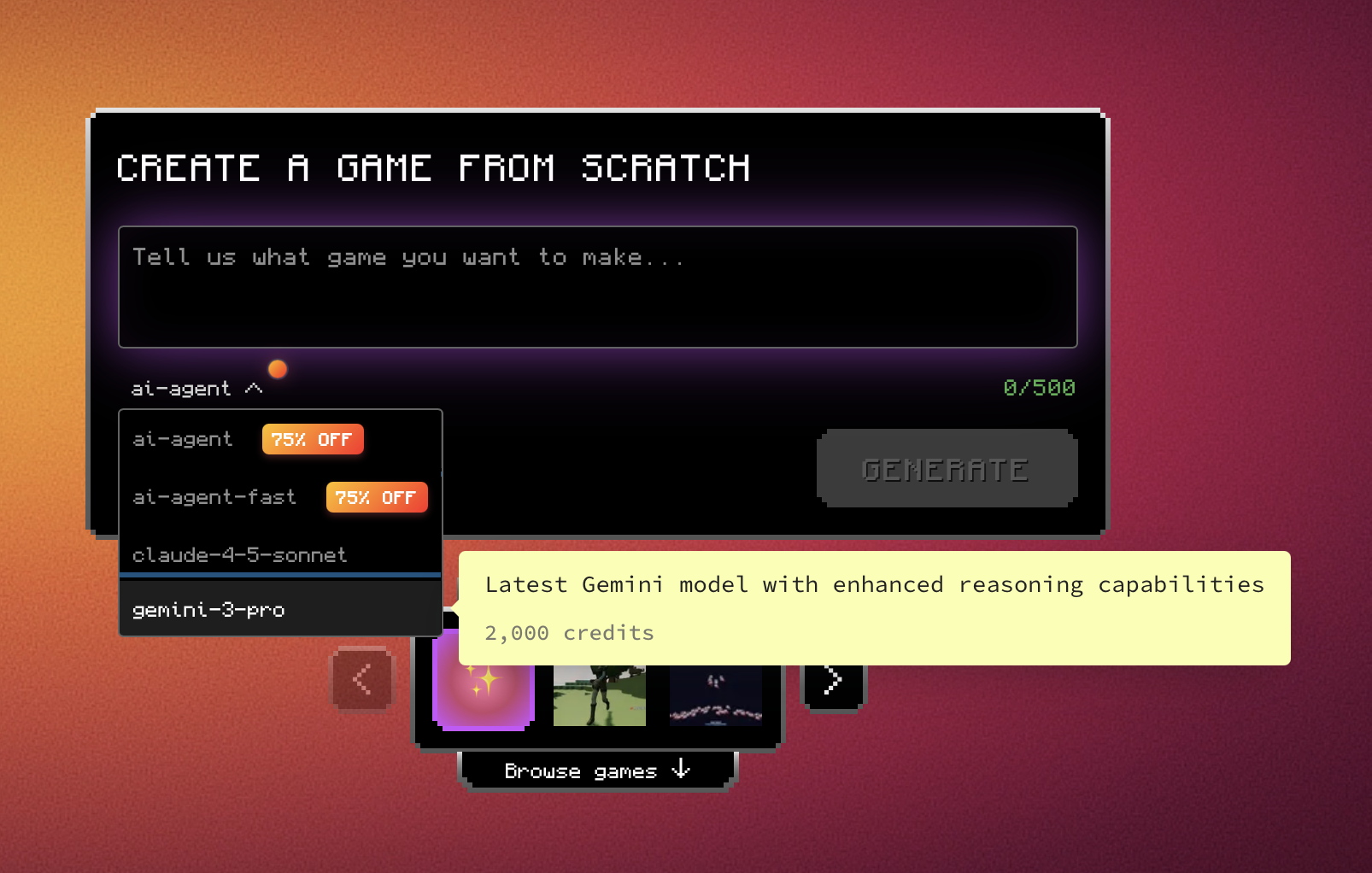
3. Under the prompt box, select the Gemini 3 Pro model
Within Rosebud AI, in the model selection dropdown (just below or next to the prompt input), pick “Gemini 3 Pro”
👉 This is where you can try Gemini 3 from Google and can leverage Google’s top-tier model for best results.
4. Write your prompt to create the game
In the prompt box, tell Gemini 3 exactly what you want. For example:
“I want to build a 2D side-scroll platformer game for browsers. The story: a small robot exploring a planet, collecting energy orbs, avoiding enemies. Art style: flat vector graphics, colourful, low-poly look. Mechanics: jump, dash, wall-jump, energy boost. Generate a complete project folder structure, main game loop code in JavaScript/Phaser 3, asset list with placeholders, and deployment instructions.”
You can adjust as you like — you’re coding the idea, and Gemini 3 will help translate it into working code + asset list + deploy steps.
5. Review or refine the output with our AI game maker.
Gemini 3 will give you a set of files or code snippets, asset lists, and possibly suggestions for visuals or sounds. Review them:
- Check if the game respect your requirements and improve it if necessary with Gemini 3.
- Inspect the code (feel free to ask follow-up prompts to refine logic, fix bugs, add features)
- Adjust the art/sound placeholders if you have your own assets
This iterative loop is key: you refine until the game logic works as you want.
6. Deploy on Rosebud AI
Once you’re happy with the game files, asset references, and code, deploy it:
- Use Rosebud AI’s deployment capability (upload your code, link assets)
- Build and publish in one click.
- Share the game link or embed it in your website/social channels
7. Test and iterate
- Play the game yourself or share with testers
- Note any bugs, improvements, balance tweaks
- Use the prompt box again to ask Gemini 3 to fix: e.g., “Add checkpoint save state”, “Implement enemy types with AI behaviour”, “Optimize asset loading performance”
- Iterate until you’re satisfied with the game experience
Key Takeaways
- By using Google’s Gemini 3 you’re working with one of the most advanced AI modelsavailable — strong at coding + reasoning + multimodal tasks.
- Pairing it with Rosebud AI gives you a powerful workflow: concept → AI-assisted generation → rapid deployment.
- Whether you’re a solo developer, creative influencer, or small studio, this combination helps you create games fast, with less manual boilerplate and more creative focus.
Final word
Ready to go? Just pick the game type you want, head over to https://rosebud.ai, select Gemini 3 Pro, and start crafting your vision. With the right prompt, you’ll harness Google’s best AI game maker to build, refine, and deploy your game — all faster than ever.

Patrick Moumiet
Patrick is a marketer at Rosebud with a background as a content creator and social media strategist. He has launched courses and coaching programs in social media marketing and content creation, coaching 500+ large-scale influencers customers. On the Rosebud blog, he writes about consumer AI and how to make money with AI, exploring ways to combine state-of-the-art models with Rosebud’s creative tools.