


How Kids Can Create Games with AI using Rosebud AI: A Fun Way to Learn Computational Thinking, AI, and Creativity
In today’s world, kids don’t just play games — they dream of creating them. And thanks to AI, that dream is now more accessible than ever. With Rosebud AI, children can create a game with AI simply by typing what they imagine. No coding background, no complex software — just creativity, curiosity, and a sense of play.
This article will show parents how Rosebud is turning kids into creators, builders, and early innovators — helping them learn AI literacy, computational thinking, CS fundamentals, product development, and even entrepreneurship in a joyful, game-based way.
🌟 Why Creating a Game with AI Is the Perfect Learning Activity for Kids
1. AI makes game creation fun, fast, and intuitive
Instead of spending months learning syntax or installing complex tools, kids can jump right into building their own worlds. They simply type what they want — a character, a level, a challenge — and Rosebud AI creates it.
2. It teaches genuine computational thinking
Kids naturally learn:
- How systems work
- How to break down ideas
- Logic and iteration
- Cause and effect
- Creative problem-solving
All by designing rules and interactions for their own AI-generated games.
3. It sparks interest in STEM, AI, and CS
Creating a game is a powerful educator. Kids learn:
- How AI responds to instructions
- How computers interpret information
- How tech products are built and refined
- How modern AI tools can accelerate creativity
It’s hands-on learning disguised as pure fun.
4. It builds early entrepreneurial skills
Every game a child creates teaches them:
- Thinking like a product designer
- Making decisions like a team of builders
- Testing ideas
- Improving based on feedback
- Sharing their creations
This is the foundation of entrepreneurship — simplified, playful, and magical.
🚀 How AI Is Transforming What It Means for a Child to “Create a Game”
Before AI, game creation required:
❌ advanced coding
❌ math-heavy engines
❌ complex software
❌ adult-level learning curves
Now, with AI:
Kids as young as 7–8 can type a story or idea, and instantly bring it to life as a playable game.
AI game creation removes technical barriers, democratizing creativity and empowering children to become makers, not just consumers. For a generation growing up immersed in technology, this is one of the most powerful and future-ready skills they can develop.
🎮 Step-by-Step: How Kids (and Parents) Can Create a Game with Rosebud AI
Here’s a simple guide parents can follow along with their children.
STEP 1 — Go to the Homepage
Visit https://rosebud.ai
No installation. No setup. Just open and start imagining.
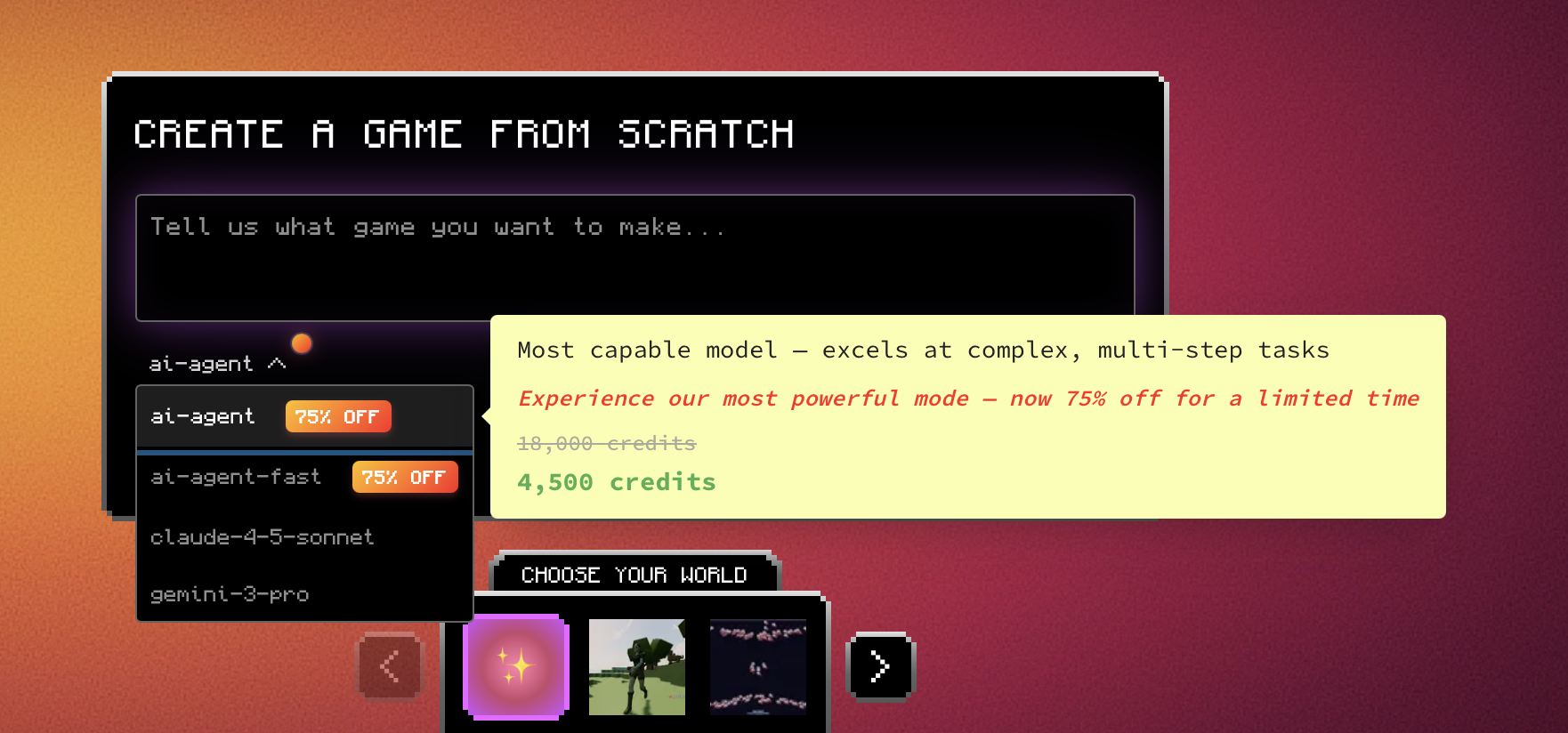
STEP 2 — Choose “Agent Mode” for the Best Results
Under the prompt box, select Agent Mode.
This tells Rosebud to work like an advanced game-creation assistant — building full game projects, not just pieces.
Agent Mode can:
- Design worlds
- Create characters
- Generate mechanics
- Adjust difficulty
- Fix bugs
- Add new features
- And even deploy the game
It’s the perfect mode for kids because it responds naturally to simple language.
STEP 3 — Start with a Simple Prompt
Parents can help kids type something like:
“Create a fun platformer game for kids where a friendly robot collects energy stars in space. Make the controls simple and the colors bright.”
Or:
“Make an AI-powered quiz adventure where a cat wizard asks fun riddles to help the player save the forest.”
Or even:
“My child wants a racing game where dinosaurs drive cars. Can you build it?”
Kids LOVE seeing their wild ideas come to life.
STEP 4 — Make Changes and Customize (A Great Learning Moment!)
This is where computational thinking really begins.
Kids can ask the AI to:
- Make levels harder or easier
- Add new enemies
- Change colors
- Add sound effects
- Switch the main character
- Add secret powers
- Change the rules of the game
- Add new worlds
- Make it multiplayer
Every tweak helps them think like a creator — not just a player.
STEP 5 — Deploy the Game and Play Together
When the game feels ready:
- Hit Deploy
- Rosebud AI bundles everything
- A link appears
- Kids can play immediately
- Parents can share the link with family & friends
It’s one of the fastest ways to see a child light up with pride.
💡 Why Parents Should Introduce Their Kids to AI Game Creation
✔ Builds confidence
Kids see their ideas turn into real software — instantly.
✔ Boosts creativity
They think bigger, experiment more, and explore freely.
✔ Teaches logic & computational thinking
Without ever feeling like homework.
✔ Helps them understand AI — the most important technology of their generation
Kids grow up AI-native, not AI-confused.
✔ Fosters leadership & entrepreneurship
They learn:
- How products get made
- How to refine ideas
- How to communicate what they want
- How to problem-solve in real time
✔ Strengthens parent–child collaboration
You’re not just supervising — you’re co-creating.
🌈 The Future: Kids Who Don’t Just Play Games — They Build Them
We’re entering a world where AI isn’t just a tool…
It’s a creative partner.
Rosebud AI makes it possible for kids to:
- express ideas
- build tech
- understand AI
- learn STEM
- practice logic
- develop resilience
- and explore entrepreneurship
ALL through the lens of playful game creation.
If you’re a parent looking to prepare your child for the future while keeping learning fun, bringing them to Rosebud AI is one of the best gifts you can give them.
🌟 Try Rosebud AI In Person — Parent + Kid Game Jam (San Francisco)
If you’re in the Bay Area, you can now experience Rosebud AI live at our upcoming Parent + Kid Game Jam in San Francisco!
This hands-on event is the perfect way for children to experiment with AI game creation while parents learn how to support their creativity, STEM curiosity, and computational thinking.
Kids will:
- Build their first AI-powered game
- Collaborate with other young creators
- Learn through play, imagination, and teamwork
Parents will:
- See how AI can empower their child’s learning
- Learn how to guide their kid’s ideas
- Be part of a supportive creative community
👉 Join the event here: https://luma.com/sxi5o8qc
🌟 Ready to Start Creating AI Games With Your Kids?
Visit https://rosebud.ai
Choose Agent Mode
Type an idea
Watch it come to life
Let your child discover the joy of AI game creation, computational thinking, STEM creativity, and entrepreneurial mindset — all through play.

Patrick Moumiet
Patrick is a marketer at Rosebud with a background as a content creator and social media strategist. He has launched courses and coaching programs in social media marketing and content creation, coaching 500+ large-scale influencers customers. On the Rosebud blog, he writes about consumer AI and how to make money with AI, exploring ways to combine state-of-the-art models with Rosebud’s creative tools.